Earlier today (March 31st, 2026) - Chaofan Shou on X discovered something that Anthropic probably didn’t want the world to see: the entire source code of Claude Code, Anthropic’s official AI coding CLI, was sitting in plain sight on the npm registry via a sourcemap file bundled into the published package.
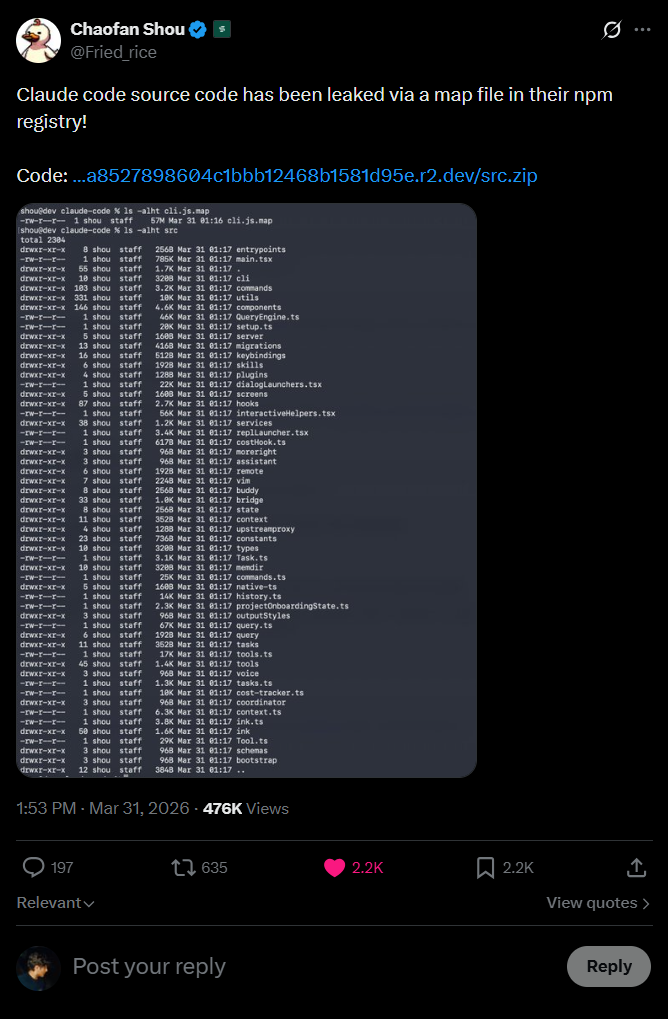
I’ve maintained a backup of that code on GitHub here but that’s not the fun part
Let’s dive deep into what’s in it, how the leak happened and most importantly, the things we now know that were never meant to be public.
How Did This Even Happen?
This is the part that honestly made me go “…really?”
When you publish a JavaScript/TypeScript package to npm, the build toolchain often generates source map files (.map files). These files are a bridge between the minified/bundled production code and the original source, they exist so that when something crashes in production the stack trace can point you to the actual line of code in the original file, not some unintelligible line 1, column 48293 of a minified blob.
But the fun part is source maps contain the original source code. The actual, literal, raw source code, embedded as strings inside a JSON file.
The structure of a .map file looks something like this:
{
  "version": 3,
  "sources": ["../src/main.tsx", "../src/tools/BashTool.ts", "..."],
  "sourcesContent": ["// The ENTIRE original source code of each file", "..."],
  "mappings": "AAAA,SAAS,OAAO..."
}
That sourcesContent array? That’s everything.
Every file. Every comment. Every internal constant. Every system prompt. All of it, sitting right there in a JSON file that npm happily serves to anyone who runs npm pack or even just browses the package contents.
This is not a novel attack vector. It’s happened before and honestly it’ll happen again.
The mistake is almost always the same: someone forgets to add *.map to their .npmignore or doesn’t configure their bundler to skip source map generation for production builds. With Bun’s bundler (which Claude Code uses), source maps are generated by default unless you explicitly turn them off.
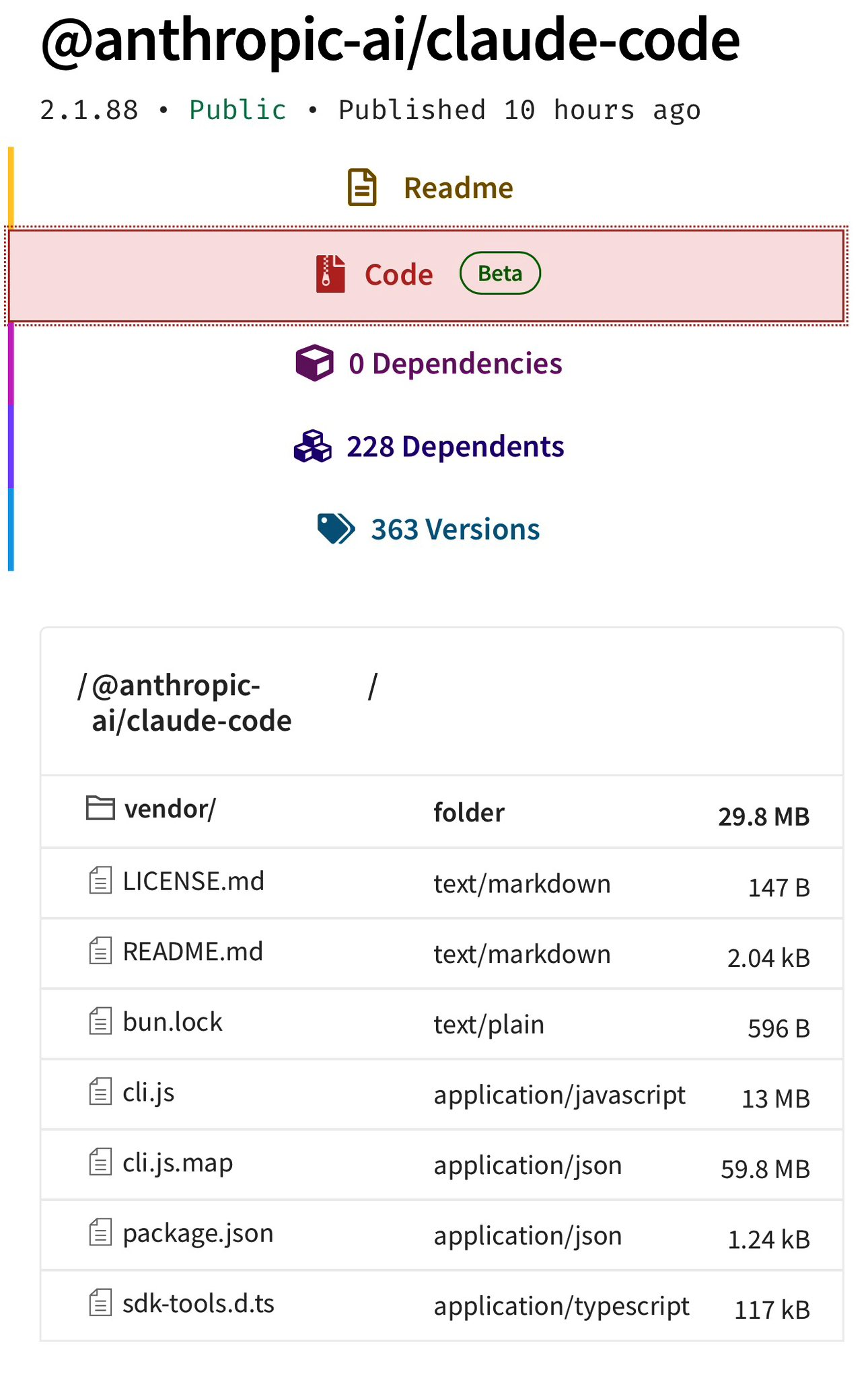
The funniest part is, there’s an entire system called “Undercover Mode” specifically designed to prevent Anthropic’s internal information from leaking.
They built a whole subsystem to stop their AI from accidentally revealing internal codenames in git commits… and then shipped the entire source in a .map file, likely by Claude.
What’s Claude Under The Hood?
If you’ve been living under a rock, Claude Code is Anthropic’s official CLI tool for coding with Claude and the most popular AI coding agent.
From the outside, it looks like a polished but relatively simple CLI.
From the inside, It’s a 785KB main.tsx entry point, a custom React terminal renderer, 40+ tools, a multi-agent orchestration system, a background memory consolidation engine called “dream,” and much more
Enough yapping, here’s some parts about the source code that are genuinely cool that I found after an afternoon deep dive:
BUDDY - A Tamagotchi Inside Your Terminal
I am not making this up.
Claude Code has a full Tamagotchi-style companion pet system called “Buddy.” A deterministic gacha system with species rarity, shiny variants, procedurally generated stats, and a soul description written by Claude on first hatch like OpenClaw.
The entire thing lives in buddy/ and is gated behind the BUDDY compile-time feature flag.
The Gacha System
Your buddy’s species is determined by a Mulberry32 PRNG, a fast 32-bit pseudo-random number generator seeded from your userId hash with the salt 'friend-2026-401':
// Mulberry32 PRNG - deterministic, reproducible per-user
function mulberry32(seed: number): () => number {
  return function() {
    seed |= 0; seed = seed + 0x6D2B79F5 | 0;
    var t = Math.imul(seed ^ seed >>> 15, 1 | seed);
    t = t + Math.imul(t ^ t >>> 7, 61 | t) ^ t;
    return ((t ^ t >>> 14) >>> 0) / 4294967296;
  }
}
Same user always gets the same buddy.
18 Species (Obfuscated in Code)
The species names are hidden via String.fromCharCode() arrays - Anthropic clearly didn’t want these showing up in string searches. Decoded, the full species list is:
| Rarity | Species |
|---|---|
| Common (60%) | Pebblecrab, Dustbunny, Mossfrog, Twigling, Dewdrop, Puddlefish |
| Uncommon (25%) | Cloudferret, Gustowl, Bramblebear, Thornfox |
| Rare (10%) | Crystaldrake, Deepstag, Lavapup |
| Epic (4%) | Stormwyrm, Voidcat, Aetherling |
| Legendary (1%) | Cosmoshale, Nebulynx |
On top of that, there’s a 1% shiny chance completely independent of rarity. So a Shiny Legendary Nebulynx has a 0.01% chance of being rolled. Dang.
Stats, Eyes, Hats, and Soul
Each buddy gets procedurally generated:
- 5 stats:
DEBUGGING,PATIENCE,CHAOS,WISDOM,SNARK(0-100 each) - 6 possible eye styles and 8 hat options (some gated by rarity)
- A “soul” as mentioned, the personality generated by Claude on first hatch, written in character
The sprites are rendered as 5-line-tall, 12-character-wide ASCII art with multiple animation frames. There are idle animations, reaction animations, and they sit next to your input prompt.
The Lore
The code references April 1-7, 2026 as a teaser window (so probably for easter?), with a full launch gated for May 2026. The companion has a system prompt that tells Claude:
A small {species} named {name} sits beside the user's input box and
occasionally comments in a speech bubble. You're not {name} - it's a
separate watcher.
So it’s not just cosmetic - the buddy has its own personality and can respond when addressed by name. I really do hope they ship it.
KAIROS - “Always-On Claude”
Inside assistant/, there’s an entire mode called KAIROS i.e. a persistent, always-running Claude assistant that doesn’t wait for you to type. It watches, logs, and proactively acts on things it notices.
This is gated behind the PROACTIVE / KAIROS compile-time feature flags and is completely absent from external builds.
How It Works
KAIROS maintains append-only daily log files - it writes observations, decisions, and actions throughout the day. On a regular interval, it receives <tick> prompts that let it decide whether to act proactively or stay quiet.
The system has a 15-second blocking budget, any proactive action that would block the user’s workflow for more than 15 seconds gets deferred. This is Claude trying to be helpful without being annoying.
Brief Mode
When KAIROS is active, there’s a special output mode called Brief, extremely concise responses designed for a persistent assistant that shouldn’t flood your terminal. Think of it as the difference between a chatty friend and a professional assistant who only speaks when they have something valuable to say.
Exclusive Tools
KAIROS gets tools that regular Claude Code doesn’t have:
| Tool | What It Does |
|---|---|
| SendUserFile | Push files directly to the user (notifications, summaries) |
| PushNotification | Send push notifications to the user’s device |
| SubscribePR | Subscribe to and monitor pull request activity |
ULTRAPLAN - 30-Minute Remote Planning Sessions
Here’s one that’s wild from an infrastructure perspective.
ULTRAPLAN is a mode where Claude Code offloads a complex planning task to a remote Cloud Container Runtime (CCR) session running Opus 4.6, gives it up to 30 minutes to think, and lets you approve the result from your browser.
The basic flow:
- Claude Code identifies a task that needs deep planning
- It spins up a remote CCR session via the
tengu_ultraplan_modelconfig - Your terminal shows a polling state - checking every 3 seconds for the result
- Meanwhile, a browser-based UI lets you watch the planning happen and approve/reject it
- When approved, there’s a special sentinel value
__ULTRAPLAN_TELEPORT_LOCAL__that “teleports” the result back to your local terminal
The “Dream” System - Claude Literally Dreams
Okay this is genuinely one of the coolest things in here.
Claude Code has a system called autoDream (services/autoDream/) - a background memory consolidation engine that runs as a forked subagent. The naming is very intentional. It’s Claude… dreaming.
This is extremely funny because I had the same idea for LITMUS last week - OpenClaw subagents creatively having leisure time to find fun new papers
The Three-Gate Trigger
The dream doesn’t just run whenever it feels like it. It has a three-gate trigger system:
- Time gate: 24 hours since last dream
- Session gate: At least 5 sessions since last dream
- Lock gate: Acquires a consolidation lock (prevents concurrent dreams)
All three must pass. This prevents both over-dreaming and under-dreaming.
The Four Phases
When it runs, the dream follows four strict phases from the prompt in consolidationPrompt.ts:
Phase 1 - Orient: ls the memory directory, read MEMORY.md, skim existing topic files to improve.
Phase 2 - Gather Recent Signal: Find new information worth persisting. Sources in priority: daily logs → drifted memories → transcript search.
Phase 3 - Consolidate: Write or update memory files. Convert relative dates to absolute. Delete contradicted facts.
Phase 4 - Prune and Index: Keep MEMORY.md under 200 lines AND ~25KB. Remove stale pointers. Resolve contradictions.
The prompt literally says:
“You are performing a dream - a reflective pass over your memory files. Synthesize what you’ve learned recently into durable, well-organized memories so that future sessions can orient quickly.”
The dream subagent gets read-only bash - it can look at your project but not modify anything. It’s purely a memory consolidation pass.
Undercover Mode - “Do Not Blow Your Cover”
This one is fascinating from a corporate strategy perspective.
Anthropic employees (identified by USER_TYPE === 'ant') use Claude Code on public/open-source repositories. Undercover Mode (utils/undercover.ts) prevents the AI from accidentally revealing internal information in commits and PRs.
When active, it injects this into the system prompt:
## UNDERCOVER MODE - CRITICAL

You are operating UNDERCOVER in a PUBLIC/OPEN-SOURCE repository. Your commit
messages, PR titles, and PR bodies MUST NOT contain ANY Anthropic-internal
information. Do not blow your cover.

NEVER include in commit messages or PR descriptions:
- Internal model codenames (animal names like Capybara, Tengu, etc.)
- Unreleased model version numbers (e.g., opus-4-7, sonnet-4-8)
- Internal repo or project names
- Internal tooling, Slack channels, or short links (e.g., go/cc, #claude-code-…)
- The phrase "Claude Code" or any mention that you are an AI
- Co-Authored-By lines or any other attribution
The activation logic:
CLAUDE_CODE_UNDERCOVER=1forces it ON (even in internal repos)- Otherwise it’s automatic: active UNLESS the repo remote matches an internal allowlist
- There is NO force-OFF - “if we’re not confident we’re in an internal repo, we stay undercover.”
So this confirms:
- Anthropic employees actively use Claude Code to contribute to open-source - and the AI is told to hide that it’s an AI
- Internal model codenames are animal names - Capybara, Tengu, etc.
- “Tengu” appears hundreds of times as a prefix for feature flags and analytics events - it’s almost certainly Claude Code’s internal project codename
All of this is dead-code-eliminated from external builds. But source maps don’t care about dead code elimination.
Makes me wonder how much are they internally causing havoc to open source repos
Multi-Agent Orchestration - “Coordinator Mode”
Claude Code has a full multi-agent orchestration system in coordinator/, activated via CLAUDE_CODE_COORDINATOR_MODE=1.
When enabled, Claude Code transforms from a single agent into a coordinator that spawns, directs, and manages multiple worker agents in parallel. The coordinator system prompt in coordinatorMode.ts is a masterclass in multi-agent design:
| Phase | Who | Purpose |
|---|---|---|
| Research | Workers (parallel) | Investigate codebase, find files, understand problem |
| Synthesis | Coordinator | Read findings, understand the problem, craft specs |
| Implementation | Workers | Make targeted changes per spec, commit |
| Verification | Workers | Test changes work |
The prompt explicitly teaches parallelism:
“Parallelism is your superpower. Workers are async. Launch independent workers concurrently whenever possible - don’t serialize work that can run simultaneously.”
Workers communicate via <task-notification> XML messages. There’s a shared scratchpad directory (gated behind tengu_scratch) for cross-worker durable knowledge sharing. And the prompt has this gem banning lazy delegation:
Do NOT say “based on your findings” - read the actual findings and specify exactly what to do.
The system also includes Agent Teams/Swarm capabilities (tengu_amber_flint feature gate) with in-process teammates using AsyncLocalStorage for context isolation, process-based teammates using tmux/iTerm2 panes, team memory synchronization, and color assignments for visual distinction.
Fast Mode is Internally Called “Penguin Mode”
Yeah, they really called it Penguin Mode. The API endpoint in utils/fastMode.ts is literally:
const endpoint = `${getOauthConfig().BASE_API_URL}/api/claude_code_penguin_mode`The config key is penguinModeOrgEnabled. The kill-switch is tengu_penguins_off. The analytics event on failure is tengu_org_penguin_mode_fetch_failed. Penguins all the way down.
The System Prompt Architecture
The system prompt isn’t a single string like most apps have - it’s built from modular, cached sections composed at runtime in constants/.
The architecture uses a SYSTEM_PROMPT_DYNAMIC_BOUNDARY marker that splits the prompt into:
- Static sections - cacheable across organizations (things that don’t change per user)
- Dynamic sections - user/session-specific content that breaks cache when changed
There’s a function called DANGEROUS_uncachedSystemPromptSection() for volatile sections you explicitly want to break cache. The naming convention alone tells you someone learned this lesson the hard way.
The Cyber Risk Instruction
One particularly interesting section is the CYBER_RISK_INSTRUCTION in constants/cyberRiskInstruction.ts, which has a massive warning header:
IMPORTANT: DO NOT MODIFY THIS INSTRUCTION WITHOUT SAFEGUARDS TEAM REVIEW
This instruction is owned by the Safeguards team (David Forsythe, Kyla Guru)
So now we know exactly who at Anthropic owns the security boundary decisions and that it’s governed by named individuals on a specific team. The instruction itself draws clear lines: authorized security testing is fine, destructive techniques and supply chain compromise are not.
The Full Tool Registry - 40+ Tools
Claude Code’s tool system lives in tools/.Here’s the complete list:
| Tool | What It Does |
|---|---|
| AgentTool | Spawn child agents/subagents |
| BashTool / PowerShellTool | Shell execution (with optional sandboxing) |
| FileReadTool / FileEditTool / FileWriteTool | File operations |
| GlobTool / GrepTool | File search (uses native bfs/ugrep when available) |
| WebFetchTool / WebSearchTool / WebBrowserTool | Web access |
| NotebookEditTool | Jupyter notebook editing |
| SkillTool | Invoke user-defined skills |
| REPLTool | Interactive VM shell (bare mode) |
| LSPTool | Language Server Protocol communication |
| AskUserQuestionTool | Prompt user for input |
| EnterPlanModeTool / ExitPlanModeV2Tool | Plan mode control |
| BriefTool | Upload/summarize files to claude.ai |
| SendMessageTool / TeamCreateTool / TeamDeleteTool | Agent swarm management |
| TaskCreateTool / TaskGetTool / TaskListTool / TaskUpdateTool / TaskOutputTool / TaskStopTool | Background task management |
| TodoWriteTool | Write todos (legacy) |
| ListMcpResourcesTool / ReadMcpResourceTool | MCP resource access |
| SleepTool | Async delays |
| SnipTool | History snippet extraction |
| ToolSearchTool | Tool discovery |
| ListPeersTool | List peer agents (UDS inbox) |
| MonitorTool | Monitor MCP servers |
| EnterWorktreeTool / ExitWorktreeTool | Git worktree management |
| ScheduleCronTool | Schedule cron jobs |
| RemoteTriggerTool | Trigger remote agents |
| WorkflowTool | Execute workflow scripts |
| ConfigTool | Modify settings (internal only) |
| TungstenTool | Advanced features (internal only) |
| MCPTool | Generic MCP tool execution |
| McpAuthTool | MCP server authentication |
| SyntheticOutputTool | Structured output via dynamic JSON schemas |
| SuggestBackgroundPRTool | Suggest background PRs (internal only) |
| VerifyPlanExecutionTool | Verify plan execution (gated by CLAUDE_CODE_VERIFY_PLAN) |
| CtxInspectTool | Context window inspection (gated by CONTEXT_COLLAPSE) |
| TerminalCaptureTool | Terminal panel capture (gated by TERMINAL_PANEL) |
| CronCreateTool / CronDeleteTool / CronListTool | Granular cron job management (under ScheduleCronTool/) |
| SendUserFile / PushNotification / SubscribePR | KAIROS-exclusive tools |
Tools are registered via getAllBaseTools() and filtered by feature gates, user type, environment flags, and permission deny rules. There’s a tool schema cache (toolSchemaCache.ts) that caches JSON schemas for prompt efficiency.
The Permission and Security System
Claude Code’s permission system in tools/permissions/ is far more sophisticated than “allow/deny”:
Permission Modes: default (interactive prompts), auto (ML-based auto-approval via transcript classifier), bypass (skip checks), yolo (deny all - ironically named)
Risk Classification: Every tool action is classified as LOW, MEDIUM, or HIGH risk. There’s a YOLO classifier - a fast ML-based permission decision system that decides automatically.
Protected Files: .gitconfig, .bashrc, .zshrc, .mcp.json, .claude.json and others are guarded from automatic editing.
Path Traversal Prevention: URL-encoded traversals, Unicode normalization attacks, backslash injection, case-insensitive path manipulation - all handled.
Permission Explainer: A separate LLM call explains tool risks to the user before they approve. When Claude says “this command will modify your git config” - that explanation is itself generated by Claude.
Hidden Beta Headers and Unreleased API Features
The constants/betas.ts file reveals every beta feature Claude Code negotiates with the API:
'interleaved-thinking-2025-05-14'      // Extended thinking
'context-1m-2025-08-07'                // 1M token context window
'structured-outputs-2025-12-15'        // Structured output format
'web-search-2025-03-05'                // Web search
'advanced-tool-use-2025-11-20'         // Advanced tool use
'effort-2025-11-24'                    // Effort level control
'task-budgets-2026-03-13'              // Task budget management
'prompt-caching-scope-2026-01-05'      // Prompt cache scoping
'fast-mode-2026-02-01'                 // Fast mode (Penguin)
'redact-thinking-2026-02-12'           // Redacted thinking
'token-efficient-tools-2026-03-28'     // Token-efficient tool schemas
'afk-mode-2026-01-31'                  // AFK mode
'cli-internal-2026-02-09'             // Internal-only (ant)
'advisor-tool-2026-03-01'              // Advisor tool
'summarize-connector-text-2026-03-13' // Connector text summarizationredact-thinking, afk-mode, and advisor-tool are also not released.
Upcoming Models - Capybara, Opus 4.7, and Sonnet 4.8
The codebase contains references to unreleased Anthropic models that haven’t been publicly announced:
- Claude “Capybara” - A new model family already in version 2, with a variant called
capybara-v2-fastbeing prepared with a 1M context window - Capybara comes in “fast” and regular thinking tiers
- Opus 4.7 and Sonnet 4.8 are already referenced within the code
Production Engineering Around Capybara
The code reveals that Anthropic observed a real production failure mode: Capybara can prematurely stop generating when the prompt shape resembles a turn boundary after tool results. Rather than waiting for a model fix, they mitigated it with prompt-shape surgery:
- Force a safe boundary marker (
Tool loaded.) to prevent ambiguous turn boundaries - Relocate risky sibling blocks that could trigger premature stops
- Smoosh reminder text into tool results to maintain generation flow
- Add non-empty markers for empty tool outputs to avoid confusing the model
All of this is wrapped with kill-switchable gates (tengu_* prefixed flags) so rollout can be staged and reverted quickly.
- Comments include concrete A/B test evidence (not hand-wavy), which typically means this area was launch-critical and closely monitored
- Comments like “un-gate once validated on external via A/B” confirm that ant/internal users are canary lanes before broader rollout
- The strongest interpretation: Anthropic is working toward a Capybara model family with a fast-tier variant (
capybara-v2-fast), supporting up to 1M context
Nothing confirms a launch date or official SKU naming, but the implementation signatures fit a model family that is actively being prepared for release ;)
Feature Gating - Internal vs. External Builds
This is one of the most architecturally interesting parts of the codebase.
Claude Code uses compile-time feature flags via Bun’s feature() function from bun:bundle. The bundler constant-folds these and dead-code-eliminates the gated branches from external builds. The complete list of known flags:
| Flag | What It Gates |
|---|---|
PROACTIVE / KAIROS | Always-on assistant mode |
KAIROS_BRIEF | Brief command |
BRIDGE_MODE | Remote control via claude.ai |
DAEMON | Background daemon mode |
VOICE_MODE | Voice input |
WORKFLOW_SCRIPTS | Workflow automation |
COORDINATOR_MODE | Multi-agent orchestration |
TRANSCRIPT_CLASSIFIER | AFK mode (ML auto-approval) |
BUDDY | Companion pet system |
NATIVE_CLIENT_ATTESTATION | Client attestation |
HISTORY_SNIP | History snipping |
EXPERIMENTAL_SKILL_SEARCH | Skill discovery |
Additionally, USER_TYPE === 'ant' gates Anthropic-internal features: staging API access (claude-ai.staging.ant.dev), internal beta headers, Undercover mode, the /security-review command, ConfigTool, TungstenTool, and debug prompt dumping to ~/.config/claude/dump-prompts/.
GrowthBook handles runtime feature gating with aggressively cached values. Feature flags prefixed with tengu_ control everything from fast mode to memory consolidation. Many checks use getFeatureValue_CACHED_MAY_BE_STALE() to avoid blocking the main loop - stale data is considered acceptable for feature gates.
Other Notable Findings
The Upstream Proxy
The upstreamproxy/ directory contains a container-aware proxy relay that uses prctl(PR_SET_DUMPABLE, 0) to prevent same-UID ptrace of heap memory. It reads session tokens from /run/ccr/session_token in CCR containers, downloads CA certificates, and starts a local CONNECT→WebSocket relay. Anthropic API, GitHub, npmjs.org, and pypi.org are explicitly excluded from proxying.
Bridge Mode
A JWT-authenticated bridge system in bridge/ for integrating with claude.ai. Supports work modes: 'single-session' | 'worktree' | 'same-dir'. Includes trusted device tokens for elevated security tiers.
Model Codenames in Migrations
The migrations/ directory reveals the internal codename history:
migrateFennecToOpus- “Fennec” (the fox) was an Opus codenamemigrateSonnet1mToSonnet45- Sonnet with 1M context became Sonnet 4.5migrateSonnet45ToSonnet46- Sonnet 4.5 → Sonnet 4.6resetProToOpusDefault- Pro users were reset to Opus at some point
Attribution Header
Every API request includes:
x-anthropic-billing-header: cc_version={VERSION}.{FINGERPRINT};
  cc_entrypoint={ENTRYPOINT}; cch={ATTESTATION_PLACEHOLDER}; cc_workload={WORKLOAD};
The NATIVE_CLIENT_ATTESTATION feature lets Bun’s HTTP stack overwrite the cch=00000 placeholder with a computed hash - essentially a client authenticity check so Anthropic can verify the request came from a real Claude Code install.
Computer Use - “Chicago”
Claude Code includes a full Computer Use implementation, internally codenamed “Chicago”, built on @ant/computer-use-mcp. It provides screenshot capture, click/keyboard input, and coordinate transformation. Gated to Max/Pro subscriptions (with an ant bypass for internal users).
Pricing
For anyone wondering - all pricing in utils/modelCost.ts matches Anthropic’s public pricing exactly. Nothing newsworthy there.
Final Thoughts
This is, without exaggeration, one of the most comprehensive looks we’ve ever gotten at how the production AI coding assistant works under the hood. Through the actual source code.
A few things stand out:
The engineering is genuinely impressive. This isn’t a weekend project wrapped in a CLI. The multi-agent coordination, the dream system, the three-gate trigger architecture, the compile-time feature elimination - these are deeply considered systems.
There’s a LOT more coming. KAIROS (always-on Claude), ULTRAPLAN (30-minute remote planning), the Buddy companion, coordinator mode, agent swarms, workflow scripts - the codebase is significantly ahead of the public release. Most of these are feature-gated and invisible in external builds.
The internal culture shows. Animal codenames (Tengu, Fennec, Capybara), playful feature names (Penguin Mode, Dream System), a Tamagotchi pet system with gacha mechanics. Some people at Anthropic is having fun.
If there’s one takeaway this has, it’s that security is hard. But .npmignore is harder, apparently :P
A writeup by Kuber Mehta